Home BETTING TOOLKIT USER GUIDE Betting Toolkit Automation Strategies per market and per selection, mixed manual/automated operation
Strategies per market and per selection, mixed manual/automated operation
Updated on 2026-09-05Betting Toolkit Automation provides several methods for identifying the selection on which an Action should be performed or a Condition evaluated. The different methods are summarized on the dedicated Action or Condition Selection page.
This flexibility in defining selections makes it possible to create many different types of Strategies. One method is particularly useful because it allows the selection to be identified when the strategy is applied to the market, based on the user's interaction with the trading interface.
This makes it possible to create Selection Strategies.
Selection Strategies
A strategy is defined as a Selection Strategy if one or more of its Actions or Conditions use the “Default Strategy Application Selection” selection method.
This mode supports a workflow halfway between manual and automated trading, providing greater flexibility: the trader identifies the selection during trading and chooses to apply a specific sequence of operations to it. The program then performs the actual operations on the market with the precision and speed of automated trading.
When this mode is used, the program immediately recognizes the strategy as one that must be started from a specific selection. An “S” symbol is displayed next to the strategy name in the Strategy Manager, making it easy to identify strategies with this characteristic.

This type of strategy is not displayed in strategy selection menus at market level: it does not appear in the Market Window, Market Monitor, or Market Strategy Application Window menus. Instead, these strategies are listed in the Ladder or Grid trading interfaces. More specifically, they appear in the Automation column of the Grid and in the Automation tab of the Ladder's bottom panel.
To make this type of strategy available in the trading interfaces, it must be assigned to one of the 5 colored robot buttons for preset strategies. To do this, right-click the desired strategy. A menu will open allowing you to create the association.
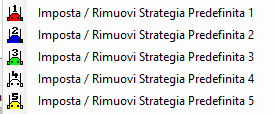
Keep in mind that if you assign a preset strategy number that has already been assigned to another strategy, that slot will be reassigned to the new strategy and the previous strategy will lose its preset strategy assignment.
In summary, there are four possible cases for a strategy once it has been programmed and its structure defined.
CASE 1 – SELECTION STRATEGY, MIXED TRADING, ACTIVE
A strategy falls into this category when:
It contains Actions or Conditions that use the selection method called “Default Strategy Application Selection”.
It is assigned as a preset strategy to one of the 5 available slots.
The strategy is not displayed in the market-level strategy application menus because, in order to operate correctly, it must be started from a specific selection. It is instead displayed in the Automation column of the Grid or on the Automation page of the Ladder's bottom panel and is marked with the letter “S”.

CASE 2 – SELECTION STRATEGY, MIXED TRADING, INACTIVE
A strategy falls into this category when:
It contains Actions or Conditions that use the selection method called “Default Strategy Application Selection”.
It is NOT assigned as a preset strategy to one of the 5 available slots.
The strategy is not displayed in any application menu and therefore cannot currently be applied. It remains stored, visible, and editable only in the Strategy Manager until it is assigned as an applicable preset strategy.

CASE 3 – MARKET STRATEGY, AUTOMATED TRADING
A strategy falls into this category when:
It does not contain any Action or Condition that uses the selection method called “Default Strategy Application Selection”.
The strategy is displayed in the strategy application menus of the Market Window and Market Monitor, is available for selection in Market Processors, and can be applied to a market through the menus listing the available strategies.

CASE 4 – MARKET STRATEGY, AUTOMATED TRADING WITH QUICK SELECTION
A strategy falls into this category when:
It does not contain any Action or Condition that uses the selection method called “Default Strategy Application Selection”.
It is assigned as a preset strategy to one of the 5 available slots.
The strategy is displayed in the preset strategy application buttons in the Market Window and in the strategy application buttons available in the Grid and Ladder.

Cases 3 and 4 can be defined as Market Strategies, since the selections on which they operate are fully defined within the strategy itself. The exception is when “Selection Assigned at Runtime” is used for one or more selections in the definition of Actions or Conditions. In this case, the selections must be specified when the strategy is applied, using the controls available in the Market Monitor or Market Strategy Application Window.
One particularly useful feature of Selection Strategies is the ability to apply multiple instances of the same strategy to the same market, starting from different selections, taking advantage of the 5 strategy slots available for each market, which allow multiple strategies to run simultaneously.
