Home BETTING TOOLKIT USER GUIDE Automation Actions Run Cash Out Action
Run Cash Out Action
Updated on 2026-09-06This Action allows you to execute a Cash Out on a market or selection according to the configured parameters.
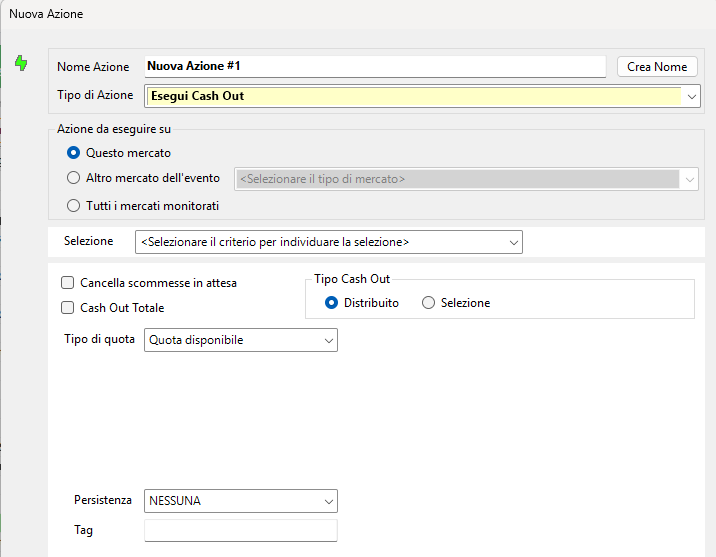
Market Selection (Action to Be Executed On)
- This Market: the Cash Out will be performed on the same market to which the strategy is applied.
- Other Market of the Event: the Cash Out will be performed on the specified market belonging to the same event as the market to which the strategy is applied.
- All Monitored Markets: the Cash Out will be performed on all markets currently present in the Market Monitor.
Cancel Pending Bets
When this option is enabled, any Pending Bets on the market will be cancelled before the Cash Out is executed.
Total Cash Out
When this option is selected, the program will perform a Total Cash Out on the market (across all selections), so there is no need to specify a selection.
Selection
For a Selection Cash Out, the selection can be identified using one of the available Selection Choice for Action or Condition.
Cash Out Type
For a Selection Cash Out, two types of algorithm are available:
- Distributed: the Cash Out aims to equalize the outcomes across all selections. The equalization applies to the outcomes resulting from bets placed on the selection being considered.
- Selection: the Cash Out aims to maximize the outcome on the selected selection, assuming that it wins.
Persistence
You can specify the persistence to assign to the bets placed to execute the Cash Out.
Tag
A tag can be assigned to generated bets so that they can be identified and selectively cancelled using the Cancel Bet(s) Action.
