Home BETTING TOOLKIT USER GUIDE Functions Trading Parameters
Trading Parameters
Updated on 2026-09-03The Trading Parameters window is used to configure the main parameters for manual trading, some of which are also available on the button bar in the main window.
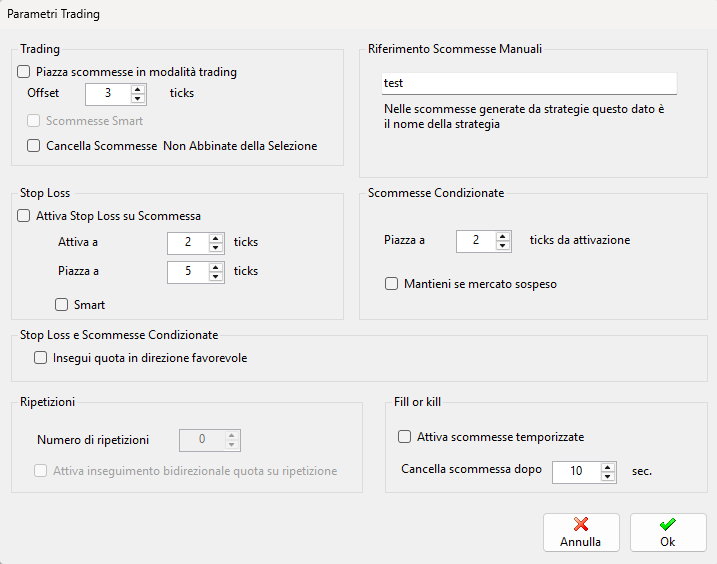
In this window, you can configure the following parameters:
- Trading Mode: this mode places a bet while simultaneously preparing a Trade Closing Bet, which will be submitted to the market once the main bet has been matched. In the event of a partial match, the corresponding portion of the matched bet will be progressively placed as an opposing bet. This feature can also be easily enabled or disabled using the Trading button on the button bar in the main window.
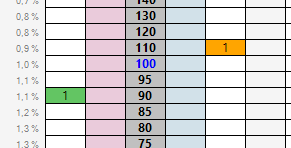
- Offset of the opposing bet when the Trading option is enabled. The offset is measured in ticks between the placement odds of the main bet and the odds of the opposing bet. An offset of 3 ticks, as in the following example, will result in 2 empty cells between the odds of the main bet and those of the opposing bet:
- Smart Bets: when this option is enabled, the stake of the opposing bet is calculated so as to generate a profit evenly distributed across the various selections if the trade is closed. A trade is considered closed when both the original bet and the opposing bet have been matched.
- Cancel Unmatched Bets on the Selection: before placing the new bet, all unmatched bets currently in the order book for that selection are cancelled. This option can also be enabled from the button bar in the main window.
- Manual Bet Reference: this optional string allows you to assign a label to all bets placed manually through Betting Toolkit, while bets placed by a Strategy have this parameter set to the strategy name. This makes it possible to generate reports on the performance of individual strategies, since this information is included in the Closed Bets (and Open Bets) lists in the Order Status window.
- Enable Stop Loss on Bet: when this option is enabled, a pending Stop Loss bet is generated together with the bet, with its trigger odds and placement odds offset by the specified number of ticks. This option can also be enabled from the button bar in the main window.
- Smart Stop Loss: similarly to opposing bets, the Stop Loss can distribute losses evenly across the various outcomes by calculating the appropriate stake required to close the trade.
- Conditional Bets: allows you to specify the number of ticks between the Trigger Odds and Placement Odds for Conditional Bets.
- Keep if Market Suspended: keeps Conditional Bets active if the market is suspended. Otherwise, market suspension causes the Conditional Bets to be cancelled.
- Repeats: allows you to specify a predefined number of repetitions of a successful trade. The number of repetitions can also be set from the button bar in the main window when Trading Mode is enabled.
- Enable Bidirectional Odds Tracking on Repeat: when this option is enabled, the trade odds are adjusted when the trade is repeated according to changes in the odds matched in the market.
- Fill or Kill (Timed Bets): when this mode is enabled, placed bets that remain unmatched can be automatically cancelled after a specified number of seconds. This option can also be enabled from the button bar in the main window.
