Home BETTING TOOLKIT USER GUIDE Functions Markets Board
Markets Board
Updated on 2026-09-02The Markets Board allows you to insert one or more monitored markets into a grid table.
This creates a multi-market view that allows you to monitor multiple markets simultaneously while still maintaining the basic functionality of the full grid interface. From these grids, you can place bets, start and stop strategies, cancel orders, Cash Out or Void selections, and place multiple or dutching bets.
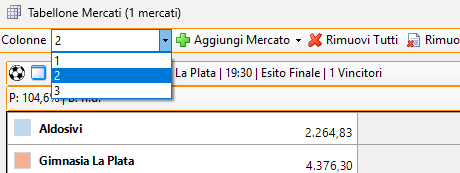
The table can be organized into columns, from 1 to 3, choosing the desired layout from the list at the top left.
Adding Markets
Pressing the Add Market button will display a list of all markets present in the Markets Monitor but not yet included in the market monitor. From this list, you can select the market to add.
Removing Markets
There are three ways to remove markets:
- Remove All button: removes all markets from the board
- Remove Closed button: removes closed markets from the board
- Each box on the board has a button to remove that market from the board.
Market Sorting
You can change the order in which markets are displayed by moving the individual boxes up or down using the appropriate buttons.
Hide Losers
The Hide Losers button hides losing selections from the market. This is particularly useful for markets where selections are progressively eliminated as the event progresses.
Bets View
Activating the Bets button allows you to display a list of your active bets on the market (up to 5 bets). Once bets are displayed, clicking them with the mouse will delete them, while clicking them while holding down the CTRL key will allow you to edit the bet.
Multiple Bets / Dutching
Two buttons provide direct access to the relevant features.
Strategies
This button displays the Strategy Application Control, which allows you to apply/unapply, start, and stop market strategies.
Selection Odds Charts
Right-clicking on the cell representing a selection's name will open the corresponding Betfair odds chart.
