Home BETTING TOOLKIT USER GUIDE Betting Toolkit Automation Strategies Application Control
Strategies Application Control
The Strategies Application Control allows you to apply/deapply, start, and stop strategies from the following trading interfaces:
- Grid (Market Window)
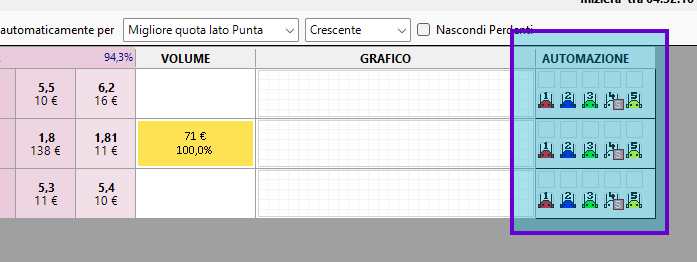
- Ladder (Market Window)
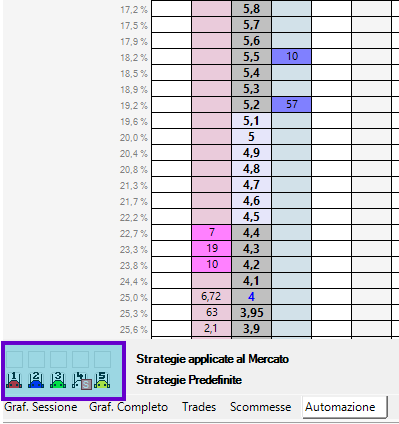
- Simplified Grid (Market Monitor and Market Board)

It allows you to easily manage the 5 free slots for applying strategies to the market.
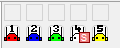
In the case of the Grid and Ladder, two rows of boxes are displayed, as in the following example.
In the case of the Market Board, only one row of boxes is shown, namely the first (the predefined strategies cannot be used except to highlight them in the strategy list menu). This row represents the available market slots. In this case, the initial situation is as shown here:
The first row of boxes represents the free market slots for applying strategies. There are 5 of these slots, and each can be used by a different strategy.
The second row represents the predefined strategies, represented by colored robots. To set predefined strategies, you need to use the Strategy Manager window. When a strategy is designed to be applied by selection, an "S" is displayed.
Using predefined strategies in Grid and Ladder
Left-clicking on a predefined strategy applies it to the first free slot in the market and starts it. For example, clicking on the blue robot in this case produces this result:
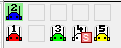
The green background color indicates that the strategy is started.
Starting and stopping strategies
Left-clicking on an item in the first row produces the following result:
- If the box is occupied by a strategy and it is started, nothing happens.
- If the box is occupied by a strategy and it is stopped, it is started.
- If the box is not occupied by a strategy, a menu opens where you can choose the strategy to apply, even from among non-predefined ones.
Right-clicking on an element in the first row produces the following result:
- If the box is not occupied by a strategy, nothing happens.
- If the box is occupied by a strategy and it is running, the strategy is stopped.
- If the box is occupied by a strategy and it is stopped, the strategy is not applied.
Selection Strategies
Selection strategies are applied from a specific selection and, although they occupy one of the five slots available for the market, can be applied repeatedly to different selections. Applying one to a single selection from the Market Board, for example, results in a situation like this (application to the first slot of the first selection):
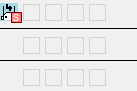
If we were to apply a selection strategy from the Market Board to all three selections in a market, the situation would be as follows:
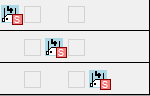
In this case, you can see the same strategy applied, with three different instances operating completely independently, on slots 1, 3, and 5. As you can see, only slots 2 and 4 are available for applying a different strategy. For example, applying a non-selection strategy to slot 2 results in the following situation:
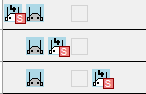
In this case, the strategy occupies slot 2, and only one instance is applied to the entire market.
For example, when you right-click on the icon for a Selection Strategy, stopping or undoing the strategy affects that specific instance of that selection. If you do the same on a market strategy, you will eliminate the slot's robots (for example, the second slot in the image above) from all selections because they only reference the strategy instance.
